사진에 있는 얼굴을 인식해서 위치를 특정하는 기능을 해보려합니다.
CoreImage의 CIDetector와 Vision의 VNDetectFaceRectanglesRequest를 사용하는 2가지 방법이있습니다.
iOS11부터 도입된 후자를 권장하고 더 강력한 기능을 제공합니다.
따라서 이번엔 VNDetectFaceRectanglesRequest를 이용한 코딩을 할예정입니다.
VNDetectFaceRectanglesRequest란?
이미지에서 얼굴을 찾도록 요청하는 타입입니다.
Vision을 쓰다보면 000Reqeust형식을 많이보게됩니다.
그 요청중 하나입니다.
final class FaceDetector {
    func detectFaceRectangles(image: UIImage) throws -> [VNFaceObservation]? {
        guard let image = image.cgImage else { return nil }
        let request = VNDetectFaceRectanglesRequest()

        request.revision = VNDetectFaceRectanglesRequestRevision3

        let handler = VNImageRequestHandler(cgImage: image)
        try handler.perform([request])
        let results = request.results
        return results
    }
}
요청을 만들고
결과값으로 VNFaceObservation을 반환받습니다.
VNFaceObservation란?
이미지에서 감지하는 얼굴 또는 얼굴 특징 정보입니다.
let observation = try detector.detectFaceRectangles(image: image)
var boundingBoxes: [CGRect] = []
observation?.forEach {
    print("description", $0.description)
    print("boundingBox", $0.boundingBox)
    print("faceCaptureQuality", $0.faceCaptureQuality)
    print("confidence", $0.confidence)
    print("landmarks", $0.landmarks)
    print("pitch", $0.pitch)
    print("roll", $0.roll)
    print("timeRange", $0.timeRange)
    print("uuid", $0.uuid)
    print("yaw", $0.yaw)

    boundingBoxes.append($0.boundingBox)
}
description <VNFaceObservation: 0x15ceac800> 484BBF54-1E67-404A-B45B-20BB5A7257BF VNDetectFaceRectanglesRequestRevision3 confidence=0.683225 boundingBox=[0.613351, 0.484306, 0.140112, 0.270106]
boundingBox (0.6133507490158081, 0.4843055307865143, 0.14011242985725403, 0.27010563015937805)
faceCaptureQuality nil
confidence 0.68322533
landmarks nil
pitch Optional(-0.317534)
roll Optional(1.027767)
timeRange CMTimeRange(start: __C.CMTime(value: 0, timescale: 1, flags: __C.CMTimeFlags(rawValue: 1), epoch: 0), duration: __C.CMTime(value: 0, timescale: 1, flags: __C.CMTimeFlags(rawValue: 1), epoch: 0))
uuid 484BBF54-1E67-404A-B45B-20BB5A7257BF
yaw Optional(-0.638136)description - 요약정보
boundingBox - 감지된 얼굴의 위치와 크기를 나타내는 정규화된 좌표, 얼굴영역표시에 사용
CGRect좌표값으로 이미지의 상대적인 위치를 나타냄
사용시 뷰의 좌표계에 맞게 변환해서 사용해야함
Vision은 왼쪽하단이 원점(0,0)이고 UIKit/SwiftUI는 왼쪽상단이 원점이므로 Y축을 뒤집어서 사용해야함
boundingBox가 (0.6, 0.4, 0.1, 0.2)일때 <<< (x위치, y위치, 가로길이, 세로길이)
이미지 가로길이가 100, 세로길이가 100이라면
가로로 0.6지점인 60포인트부터 길이가 0.1인 10에 얼굴이 인식됫다는 것을 알려줍니다.
즉, 60~70 포인트에 얼굴이 포함됩니다.
세로는 0.4지점 40부터 세로길이 0.2인 20에 얼굴이 인식됬습니다.
즉, 40~60입니다.
이 정보를 종합하면 (60, 40), (70, 40), (70, 60), (60, 60)
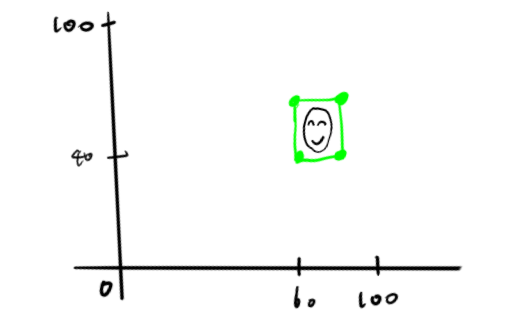
이해를 돕기위해 그림을 그려봤어요 ㅎ...(그림에서 Y축 반전은 우선 신경쓰지 마세요 이해용입니다!)
CoreImage를 이용한 처리에는 좌표를 그대로 써도되서 무관하지만 보통 CGImage나 View로 그리기때문에 Y축은 각별히 신경써야합니다.
    func convert(boundingBox: CGRect, to bounds: CGRect) -> CGRect {
        let imageWidth = bounds.width
        let imageHeight = bounds.height

        let frame = CGRect(
            origin: CGPoint(
                x: boundingBox.origin.x * imageWidth,
                y: (1 - boundingBox.maxY) * imageHeight
            ),
            size: .init(
                width: boundingBox.width * imageWidth,
                height: boundingBox.height * imageHeight
            )
        )

        return frame
    }

    // CIImage용
    func ciImageRect(boundingBox: CGRect, to bounds: CGRect) -> CGRect {
        let imageWidth = bounds.width
        let imageHeight = bounds.height

        let frame = CGRect(
            origin: CGPoint(
                x: boundingBox.origin.x * imageWidth,
                y: boundingBox.origin.y * imageHeight
            ),
            size: .init(
                width: boundingBox.width * imageWidth,
                height: boundingBox.height * imageHeight
            )
        )

        return frame
    }
뷰좌표계로 컨버팅하는 함수를 이용했습니다.
x축은 비례로 좌표를 변환하고 y축은 뒤집어서 비례로 좌표를 변환했습니다.
faceCaptureQuality
감지된 얼굴이 얼마나 품질이 좋은지
가장 잘나온 사진 판별가능
face capture quality request시 제공
confidence
감지신뢰도 1에 가까울수록 신뢰성 높음
landmarks
눈,코,입,얼굴윤곽선 등 세부얼굴 특징점 정보
face landmark request시에만 제공됨
pitch
얼굴의 세로 회전각 (x축 기준으로 머리를 위아래로 움직일때 각도)
roll
얼굴의 회전정도 (z축)
timeRange
얼굴인식이 적용되는 비디오구간 정보(이미지는 존재x)
yaw
얼굴의 수평방향 회전 (y축, 고개를 좌우로 돌리는각도)
좌표를 계산해서 아래와같이 인식된 얼굴영역에 테두리를 그려볼수있습니다.

'iyOmSd > Title: Swift' 카테고리의 다른 글
| [iOS] AI 기본 개념부터 온디바이스까지 정리해보기 (1) | 2026.03.31 |
|---|---|
| [Swift] Core Image Filter (0) | 2026.01.27 |
| [Swift] Screen Time API(DeviceActivity) (0) | 2025.10.27 |
| [Swift] Screen Time API(FamilyControls, ManagedSettings) (0) | 2025.09.26 |
| [Swift] WWDC25 Explore concurrency in SwiftUI (2) | 2025.08.28 |